Tuesday, 24 February 2015

BINOY'S DRIVER LOCKER V 1.0

HELLO FRIENDS TODAY IM GOING TO GIVE YOU "BINOYS DRIVER LOCKER V 1.0".

DO YOU HAVE SECRETS THEN LOCK YOUR SECRETS WITH MY BINOY'S DRIVER LOCKER. WITH THIS LOCKER YOU CAN HIDE & UNHIDE DRIVERS IN YOUR PC WITH SIMPLE STEPS.

KEY FEATURES :
  • PASSWORD PROTECTED. 
  • YOU CAN CHOOSE YOUR PASSWORD. ALSO YOU CAN CHANGE
  • EASY TO USE
  • WITHIN 2 SEC YOU CAN HIDE & UNHIDE DRIVERS
  • ACCESS FROM DESKTOP WITH SHORTCUT

HOW TO USE :


* AFTER DOWNLOAD EXTRACT THE FOLDER TO "C" DRIVE IN YOUR PC

NOTE : EXTRACT THE FOLDER TO C DRIVE ONLY NO MEANS THE LOCKER WONT WORK

* CLICK ON BINDL.EXE

* THATS IT AFTER INSTALLATION CHOOSE YOUR PASSWORD

* LOGIN LOOKS LIKE BELOW
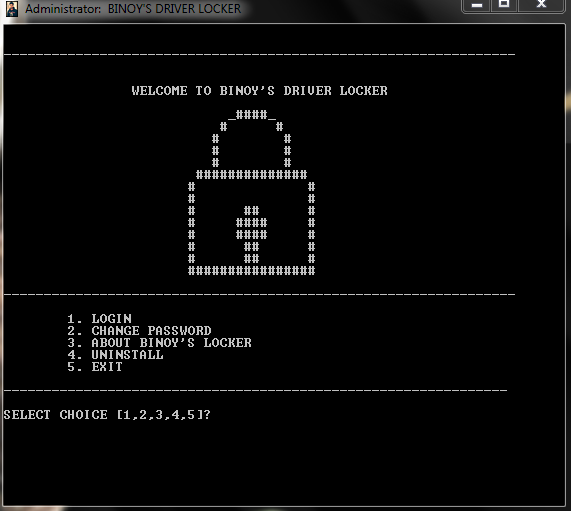


* WHEN YOU LOGIN TO THE LOCKER WITH YOUR PASSWORD A TEXT FILE WILL BE        OPEN LIKE  BELOW


* IN THE ABOVE IMAGE 01234 ARE THE VOLUMES MEANS DRIVER NUMBERS AND  LETTER GCD ARE THE LETTERS FOR DRIVERS

* IN ABOVE FOR DRIVER 1 & 4 DONT HAVE LETTER THAT MEANS THEY ARE IN          HIDDEN MODE. I HIDED THEM TO SHOW YOU AN EXAMPLE

* ENJOY

Wednesday, 25 June 2014

Protect/Lock Your BATCH FILE,VBS SCRIPT,JAVA SCRIPT From Editing By Others

Hello friends , are you a BATCH or VBS SCRIPT or JAVA SCRIPtT developer. Do you want to protect your batch, vbs, java script content. Then here is the solution,.

Upload your batch or vbs or java script files to my blog, i will complile the script files in C & C++ and i will make the scripts as executable(.EXE) files.

ADVANTAGE:

  • No one can access the file after the compile
  • No one can edit
HOW TO UPLOAD:
  • Add your BATCH or VBS or JAVA SCRIPT to winrar archive , and send your files to my mail id: binobinoy51@gmail.com
  • After uploading add a comment below the post, that the name of winrar and your email address
  • Also include your information in winrar in a text file to add detail to the .EXE file
  • (OPTIONAL) you can put your image in winrar i will add your image to the .EXE file as ICON
HOW TO GET YOUR COMPILED .EXE FILE:
  • I will send the .EXE file to your EMAIL
enjoyyyy..........................


Example: BAT FILE  EXE FILE

download these files one is batch file and another is executable file


Friday, 7 March 2014

Download Torrent File Using IDM

Hello friends, today i will show you the way to download torrents with Internet Download Manager. Torrent is tiny file with .torrent extension which allows you to download huge amount of data. We use torrents to download various stuffs like movies, games, software package and plenty of different things. you'll transfer torrents from several website. The transfer speed for torrents depends on seeds it has. It will make difficult for you to download files with very low or no seed counts. However with the assistance of this trick you'll be able to download torrent file with IDM. This tool can be really helpfull when you want to download file that has very low seeds. IDM is the quickest file transfer manager on the internet market. So lets begin!

1. First download the torrent file with .torrent extension which you wish to download from the internet directly without any torrent client like utorrent.
2. Now open www.zbigz.com and you will land on its homepage


3. Then Click on upload Torrent and browse your torrent to transfer and click on Go.


4. Then it will ask you for Free or Premium service, choose Free to proceed further.
5. It will cache your file as shown.


6. Once the caching is done, click on transfer button to download your file as shown below.


7.You should have internet download manager installed on your computer so that download start inside IDM. If you don't have IDM don't worry it will download directly.
Awesome Hot Pink Sharp Pointer